Table of contents
Open Table of contents
Introduction
I’ve been using Claude Code as a kind of personal assistant for a couple months now. There’s an instance of it that lives in an Obsidian vault tracking my knowledge base which includes notes from learning and building, but also things like, workout tracking, a log of my progress learning to swim, bookmarks for apartment hunting, etc. This Claude instance reads from my vault, executes some code, and then simply updates my vault. Since the vault is a collection of local markdown files, there’s no special MCP or skill required to interact with it. Still, everytime I ask it to do the same thing twice, I create a skill out of it so it doesn’t spend tokens figuring out my workflow again and again. For example: doing a review of the past week based on my daily notes and todos.
This setup has unlocked a lot of interesting use cases and automations. But there were plenty of times when I wanted to access this Claude Code instance on my phone or iPad. Or wanted to make sweeping changes to my todo app (Things for Mac, using a CLI tool to interact with it). Or wanted it to run cron jobs for the skills and workflows I’d created, even when my primary machine was turned off.
OpenClaw has absolutely exploded in popularity over the last couple of months, and I guess plenty of people had been thinking about this same problem. It’s an open-source framework for deploying Claude (or other LLMs) as a persistent assistant with access to local files and apps available on the channel or messaging app of your choice.
I spent the last weekend setting this up, and one week in, I have thoughts.
The Setup
First decision: where to host this thing. I needed it running 24/7 with access to apps that can be clunky to make work with headless environments (like Obsidian) or worse, don’t work at all on non Apple environments (like Things, my todo manager). After looking at cloud VMs and various deployment options for a couple days, I settled on a Mac Mini and found a cheap, used basic M2 version in Singapore. The Mac Mini isn’t doing any inference so specs didn’t matter, but I still wanted the easiest integration to my existing productivity suite.
The assistant, I call him James (don’t ask why), has its own digital identity - its own Google and Apple account. I share read-only access to specific calendars to James and, it can invite me to events or check my calendar for open slots if need be.
For file access, I don’t share anything from my personal computer. I created a separate Obsidian vault for the workflows that I wanted to try out, and synced it to the MacMini via iCloud.
Models: The default model that I use is Claude Sonnet 4.5. I’ve found it to hit the sweet spot for cost versus capability. Opus would be better for complex reasoning, but I don’t have that kind of money to spare. I tried Kimi 2.5, but found it less reliable at following the specific workflows I’d defined.
Channels: My primary way to interact with James is through Telegram. It’s fast, works on most of the devices I have, and has decent out of the box integration. I use it throughout the day for quick questions, sending articles to save & summarize, or checking my schedule. It can proactively send me notifications when it’s completed certain automated workflows.
I also set up Gmail as a secondary channel so I can forward emails to James for processing. This one required more careful engineering though. I don’t want anyone other than me sending emails to James - after all, it’s my personal assistant. I implemented a deterministic hook that filters incoming emails against an approved sender list - so anything from unapproved email accounts is ignored. When I asked James to implement this filter itself, it chose an LLM based filtering mechanism, and we learned pretty quickly that it won’t work.
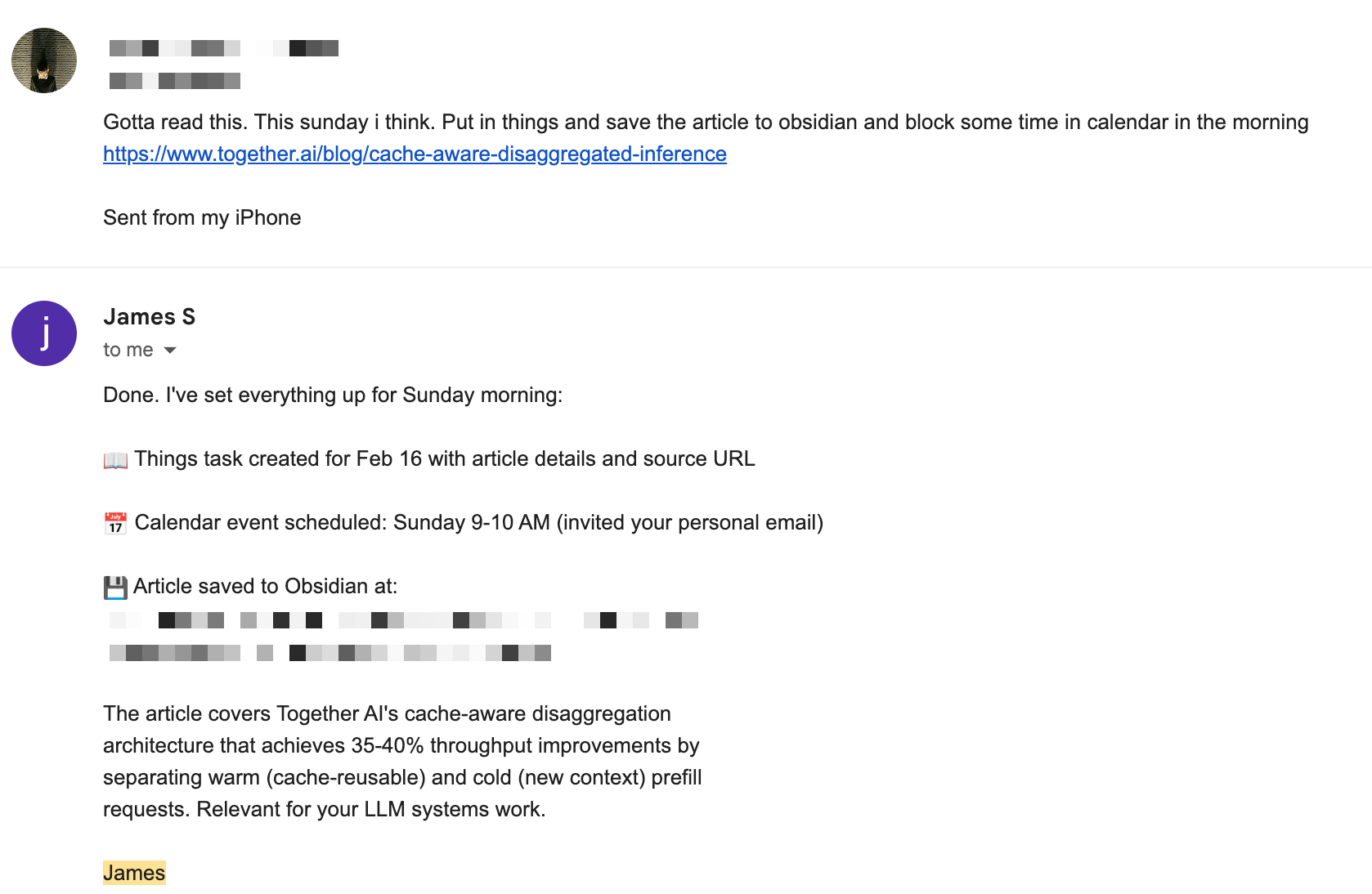 James autonomously processing an email: extracting tasks for Things, scheduling calendar events, and saving articles to my knowledge base
I set up Tailscale to access the Mac Mini when I’m not nearby to debug it (which I’ve needed to use a lot).
The Workflows
I started with a few core workflows, planning to expand as I learned what actually provides value.
Productivity
Daily briefing: Every morning, James scans my calendar and Things, then sends me a briefing. I’ve prompted it to analyze whether I’m being realistic about my day, i.e. if I am trying to squeeze 12 hours of work into 8? Are there conflicts? This nudge is surprisingly valuable because I’ve not historically been great at maintaining work-life balance. Having something call out when I’m overcommitted helps me recalibrate before the day starts.
Evening checks: At the end of the day, James reviews what got done versus what was planned. Did anything slip? Are there things on my calendar or todo list that I am forgetting about?
Weekly review: I started doing weekly reviews in 2024, but only managed to do them 25 out of 56 weeks. Now James does the heavy lifting: scans my notes, tracks progress on personal projects, identifies patterns in what I completed versus postponed. It sends me a summary and asks if I want to add reflections. Having it automated definitely takes the busywork out of it, though I’m still wondering whether the insights come from the gruntwork of compiling the review or from the reflection itself. Not sure yet.
Studying
This one’s simple for now but I think has the most potential. I log articles I read and courses I’m taking in Obsidian. The problem for me has been mistaking passive learning for making progress in getting better at the things I care about. Being honest, it’s hard to recall a great engineering article I’ve read two weeks later.
James now reviews what I’ve learned each week and proactively quizzes me. I like to think of it as Duolingo for the topic and material I care about rather than a pop quiz. These conversational questions test my recall and understanding. A cron job runs this twice a week automatically. I’m working on expanding this into something more comprehensive and reliable, but for me this has been the best workflow yet.
Fitness
James tracks my programs, logs progress, and checks my calendar for scheduled workouts. If nothing’s scheduled for tomorrow, it pings me. On workout days, it reminds me what the routine is. It’s integrated with Hevy - a workout tracking app I use. I log sets and reps during workouts, and James can access that data to understand my progress.
Future Extensions
I’m thinking about adding more workflows in the coming weeks for things like:
Apartment hunting: Tracking listings, comparing neighborhoods, monitoring prices, reminding me to follow up. All the tedious tracking work that’s perfect for an AI assistant.
Career Opportunity Tracking: Monitoring opportunities that align with my experience and aspirations, identifying networking events etc.
And more may emerge as time goes on!
Does It Actually Work? Or is it just hype?
Honest answer: it’s complicated. There are really two questions here: does it work at a technical level, and does it provide value? The answer to both, one week in, is still unclear.
Does it work technically?
If you’re reading my blog, you probably already know that LLMs are non-deterministic. When you’re running multi-step workflows, you can’t rely on them to take the same path every time. This creates some real challenges.
Take the email response workflow as an example. First time I set up Gmail responding, I asked James to implement it. It did okay, but wouldn’t mark emails as read after responding. Instead, it added an automation in its heartbeat.md file (an evergreen agentic cron job) to check for unread emails every heartbeat cycle (30 minutes). I got multiple responses to the same email. Classic LLM behavior: solve the immediate problem without considering consequences.
I asked it to fix itself. It tried implementing a “read list” tracking system in a JSON file, that the heartbeat job would read. But the agent would sometimes forget to check the file. More duplicate responses.
Eventually I went in and stripped out all the heartbeat-based email tracking, and modified the response hook to mark emails as read immediately after replying. Sure, maybe some emails slip through, but that’s acceptable for me. Building AI agents for the past few years has taught me that some logic just needs to be deterministic code.
Another issue: when I ask James to adjust a workflow, it doesn’t show me exactly how it’s implementing things in the backend. I have to dig into the files myself to understand what it actually did. Maybe that’s too much to expect at this stage, but it’s something I wish worked better.
Model switching also has consequences. When I tried Kimi to save money, I discovered different models interpret workflow specifications differently. Kimi wouldn’t follow the exact format I’d specified for daily briefings. It struggled with conditional logic in my evening check-ins (“only ask me to schedule a workout if there’s none planned the following day”). I went back to Sonnet 4.5 and ate the cost just to not have this be so annoying. I didn’t face these problems with my light experiments with Opus.
OpenClaw is not the polished, ready-to-use product that some of the hype suggests. There’s definitely a lot of tinkering required. Setting up reliable workflows requires significant trial and error, engineering know-how to bridge the gap between the agent’s free-form capability and well-engineered constraints in code, and a lot of time debugging edge cases.
Does it provide value?
A friend asked me after learning about my adventures with James: “You spent how many hours setting this up? For what, automated todo list reviews?”
Here’s where I’m at after one week:
It’s hard to measure ROI this early. I’ve invested a significant amount of time in setup and debugging. The productivity gains are hard to measure. Am I replacing the busywork of managing my systems with the busywork of building a bot that manages my systems?
I’m betting the use cases will grow over time. Right now I have five workflows. In a month, maybe ten, and so on. The infrastructure is there, and adding new workflows gets easier as I understand the patterns.
But for me it’s the joy of experimenting with it. Building a system that can perhaps replace my app subscriptions while also being personalized for the things that I care about is genuinely exciting. I don’t plan to let the bot join Moltbook or write hit pieces when its PR is rejected on Github. I’m content with letting it be my personal assistant, not some AGI experiment.
The automation also feels personal in a way that generic productivity tools don’t. The contextualization is what gives it value, even if it’s hard to quantify. It beats managing my personal ChatGPT subscription with a personal Claude subscription and a work Claude subscription etc., each with access to their own projects and folders and mish-mash of contexts.
What This Means for the Future of Agents
After just one week with OpenClaw, I get the hype. This isn’t just about having a personal assistant. It’s a glimpse into where the entire AI agent ecosystem is heading.
Omnipresent Agents Are the Future
The most striking thing about OpenClaw is that it meets me where I already am. I don’t need to open a specific app or be at my desk. It’s in Telegram, it’s in my email, it could be in Slack or WhatsApp or whatever else I use. This omnipresence matters more than I initially realized.
People don’t want another app to check. They want agents that integrate into their existing communication flows. The power isn’t in the agent itself, but in being accessible wherever you naturally spend your time.
Hyper-Contextualized Agents Win
Generic ChatGPT or Claude with a folder of documents uploaded just doesn’t cut it for real productivity work. The value comes from deep integration: agents that can actually access your apps, read your calendar, check your todos, understand your knowledge base, and most importantly, take actions on your behalf.
This is the same insight that makes Claude Code so powerful for developers. Claude Code doesn’t just answer questions about your codebase. It operates on it. It reads files, writes code, runs tests, creates commits. OpenClaw is the same concept extended to personal productivity systems. Instead of a chatbot with context, you get an agent with agency.
Big Tech Is Moving Fast
The timing here is telling. Just yesterday, Peter Steinberger, OpenClaw’s creator, announced he’s joining OpenAI. This signals that the major AI companies recognize this space is critical and are moving aggressively to capture it.
Look at what’s happening:
- Meta has Manus, their own take on AI agents
- Anthropic has Claude Code for developers and CoWork for workplace collaboration
- OpenAI is clearly investing in this direction with the Steinberger hire
The pattern is clear: foundation model companies aren’t satisfied just providing APIs. They want to own the agent layer that sits on top of their models and integrates into users’ daily workflows.
This Is the Next Logical Step
It feels inevitable when you think about it. We went from:
- Chat interfaces that answer questions →
- Chat interfaces with memory and projects →
- Agents that can call tools and APIs →
- Integrated agents that proactively act on your behalf
OpenClaw and similar frameworks represent step 4. They’re moving AI from reactive to proactive, from stateless conversations to persistent, contextualized assistants that understand your systems and can operate within them autonomously.
What surprises me most is how conspicuously absent Apple seems from this space. They have all the advantages: complete control over their ecosystem, native on-device AI without relying on external API calls, Siri already on every device, AppleScript and Shortcuts for app automation. They could build this integration far more seamlessly than anyone else. And yet, despite all these structural advantages, they seem far behind. Maybe Apple Intelligence will evolve into something like this, but right now it feels like they’re missing a massive opportunity while open-source projects and AI startups are defining what personal AI assistants should be.
So where does this leave me and my experiments with James? Cautiously optimistic. The technology clearly works, even if it requires tinkering. The workflows are already providing value, even if that value is hard to quantify. And the trajectory of where this is all heading (omnipresent, deeply contextualized agents that understand and operate within our personal systems) feels both inevitable and genuinely exciting.
For now, I’m going to keep experimenting, keep building new workflows, and keep learning what it means to have a truly personal AI assistant. The future is coming fast, and it’s fascinating to be building it one automation at a time.