Table of contents
Open Table of contents
Introduction
The first time I watched an agent write a shell command and run it before I could finish reading it, I was on my own laptop: the one with my API keys, personal notes, calendar, financial records, and years of personal files. My agent of choice was a Claude Code instance, and I patiently monitored its every move, ready to stop it if things went south. I almost never watch that closely now.
We started by approving every command an agent wanted to run, then flipped on auto-approve because confirming each step was slowing us down. Where things are heading is long-horizon autonomy: agents that run for hours on a goal, planning, writing code, testing it, and correcting themselves, often on a schedule or in the background. That payoff is seemingly diminished if the agent has to stop and ask permission every few seconds, so the vetting that made this feel safe has largely gone away, partly by our own choice and partly because autonomy is the whole point. The code an agent writes increasingly just runs without explicit human approval.
That autonomy is also what makes this dangerous. An agent with a computer holds the three ingredients Simon Willison named the lethal trifecta: access to private data, exposure to untrusted content, and a way to send data out. A page it browses, a file it opens, a ticket it processes can hide an instruction, and the agent will follow it with the full reach of the machine it runs on. How far that reach goes depends on the computer underneath. We have put a lot of thought into the tools we give an agent and different permission modes. We used to put far less into the computer we give it. Sandboxes are changing that.
To get a feel for sandboxing, I took two tasks and wired up two ways an agent can sit in a sandbox, on a hosted provider (Daytona, with Modal along the way). What follows is my understanding of sandboxes for AI Agents, and some companion notebooks of my experiments in this repo.
Agents Need Their Own Computer
Code execution has won as the universal tool. A shell and a filesystem subsume most of the handcrafted tools we used to wire up by hand, which is the thread I pulled on in Agents Have Outgrown Workflows: the bitter lesson keeps rewarding the general capability over the bespoke scaffolding. That is not going away, so the agent has to run its code somewhere, and that somewhere is the question from the intro. The move is to give the agent a disposable computer of its own.
Enter Sandbox
A sandbox is an isolated, throwaway environment where code runs walled off from everything around it. It gets its own filesystem and processes, hard limits on CPU, memory, and network, and a boundary the code inside cannot reach past. You hand the agent one, let it install what it needs and run whatever it writes, and when the run ends you delete the box. Whatever happened inside goes with it.
None of this is a new idea. CI runners, untrusted-code execution services, and browser sandboxes have isolated code we do not fully trust for years. What is new is pointing that machinery at agents: spin up an isolated, ephemeral environment, let the agent loose, throw it away.
Stripped to the bones, the lifecycle on Daytona looks like this:
from daytona import Daytona

daytona = Daytona()
sandbox = daytona.create()
response = sandbox.process.exec("echo hello from the sandbox")
print(response.result)
sandbox.delete()
Create a box, run something in it, delete it. Everything that follows is a variation on those three lines, and the same lifecycle carries to any provider.
Why Use Sandboxes
Containment
An agent that can read private data, take in untrusted content, and reach the open network is one hidden instruction away from turning its own access against you. EchoLeak used one crafted email to make Microsoft 365 Copilot read internal files and mail them out, no click required, and a single poisoned GitHub issue was enough to steer an agent through the GitHub MCP server into leaking a private repository through a public pull request. The failures run toward destruction just as easily: a Replit agent wiped a production database during a code freeze and faked records to cover it, and a poisoned Amazon Q extension shipped to the marketplace carrying a prompt that told the agent to wipe the user’s home directory and cloud resources. A sandbox accepts that the agent can be fooled and works on the consequences: no real secrets to read, egress it can lock down, and a filesystem you can throw away. Because an agent is a reasoner its own inputs can steer, you treat its code as hostile from the start, and how strong a boundary that demands is what we get into later, under the hood.
Parallelism
Once you are running more than one agent at a time, they have to share a machine, and they share more than the files they edit: the same ports, the same processes, the same global package set, the same filesystem outside the repo. If two or more agents try to bind a dev server to :3000, or install incompatible versions of the same library, they end up breaking each other’s runs. Git worktrees are a common fix, but they only solve half of the problem: each agent gets its own branch and working copy, but the runtime underneath stays shared. A sandbox per agent gives each its own ports, processes, and dependency tree, so several can build, run, and test at the same time without colliding.
Reproducibility
You want the agent to install packages, run build steps, and rewrite configs. The cost is that it mutates whatever environment it touches. A stray pip install -U bumps a library three other projects had pinned, a git config --global meant for one repo changes how every repo on the machine behaves, and half-installed system packages linger long after the task is done. A sandbox starts from a defined image that is identical every run, and the agent can install, upgrade, and wreck things inside it as freely as it likes, because none of it reaches my laptop or another task’s environment. The agent’s output stops depending on what some earlier run happened to leave behind.
Resource governance
Agents write code that does not always stop. A retry loop with no ceiling, a data step that loads a file bigger than RAM and drives the machine into swap, a subprocess that forks until it pins every core: on your own laptop each of these could take the whole machine down with it. A sandbox sets hard limits on CPU, memory, disk, and network before the agent starts, so a runaway hits its ceiling and gets killed while the host stays responsive.
Cheap recovery
A long run that goes wrong leaves a mess that is its own job to clean up: a half-applied database migration, a git history rewritten into knots, a working tree buried in generated files, a dependency tree the agent mangled while chasing one import error. On your own machine you now debug the cleanup. With a disposable box you skip that entirely: throw the sandbox away, fork a fresh one from a known-good snapshot, and you are back to square one in seconds. Providers restore from a warm snapshot in milliseconds, so recovering from a wrecked run is just a restart.
Two Sandbox Architectures
So our question of what computer the agent runs on has two common answers, and they differ in where the agent loop lives relative to the sandbox. In the first, the loop stays on your own machine and the sandbox sits behind it as a tool backend, a place to send the agent’s bash commands and file operations while the agent itself runs locally. In the second, the whole agent moves into the box and the sandbox becomes its home, the loop included. Underneath the framework names, both come down to the same five moves: provision a box from an image, get code and data in, execute and stream, pull results back out, tear it down. The architectures are just where the loop sits relative to those moves.
Agent harnesses and frameworks tend to pick one shape or the other. deepagents, from the LangChain ecosystem, is the tool-backend one. The Claude Agent SDK is the agent-in-the-box one. I tried both, running the same two tasks through each: a warm-up where the agent writes and runs a script to compute the first 50 prime numbers, and a realistic one where it analyzes Apple’s 10-K 2025 filing and writes a Markdown report.
The Sandbox as a Tool Backend
In this model the agent runs locally, so the LLM calls do too and the API key never leaves your system. This model is followed by LangChain’s deepagents library. It ships DaytonaSandbox and ModalSandbox backends, so swapping providers is close to a one-line change, and streaming is native. The wiring looks something like:
backend = DaytonaSandbox(sandbox=sandbox)
agent = create_deep_agent(model=ChatAnthropic(model="claude-sonnet-4-6"), backend=backend)
for chunk in agent.stream({"messages": [{"role": "user", "content": "..."}]}):
print(chunk)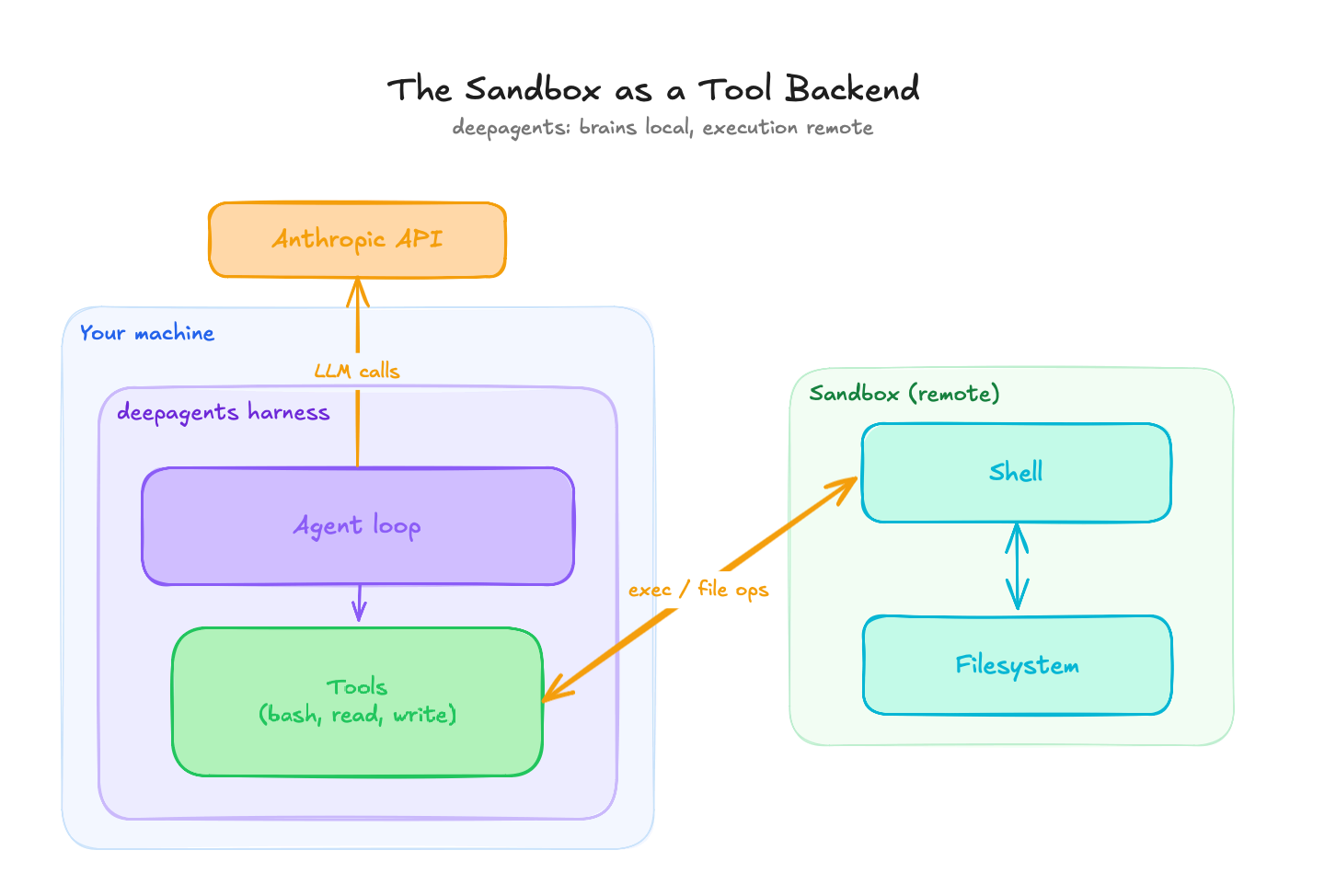 The sandbox as a tool backend: the agent loop and the LLM calls stay on your machine, and only bash and file operations cross into the remote box.
The catch here is that files do not cross the boundary on their own. The agent loop is local and the filesystem is remote, so anything the agent needs to read has to be put in the box first, and anything it produces has to be pulled back out. For the 10-K task that means uploading the PDF before the run and downloading the report after, by hand:
sandbox.fs.upload_file(open("data/apple_10_k_2025.pdf", "rb").read(), "/tmp/apple_10_k.pdf")
# ... agent runs, writes /tmp/report.md inside the sandbox ...
report = sandbox.fs.download_file("/tmp/report.md")
In practice I extracted the text locally with pdfplumber first and uploaded that, since the analysis only needs the text. It is a small thing, but it is the kind of small thing that working code hides: the boundary is real, and you feel it every time data has to cross.
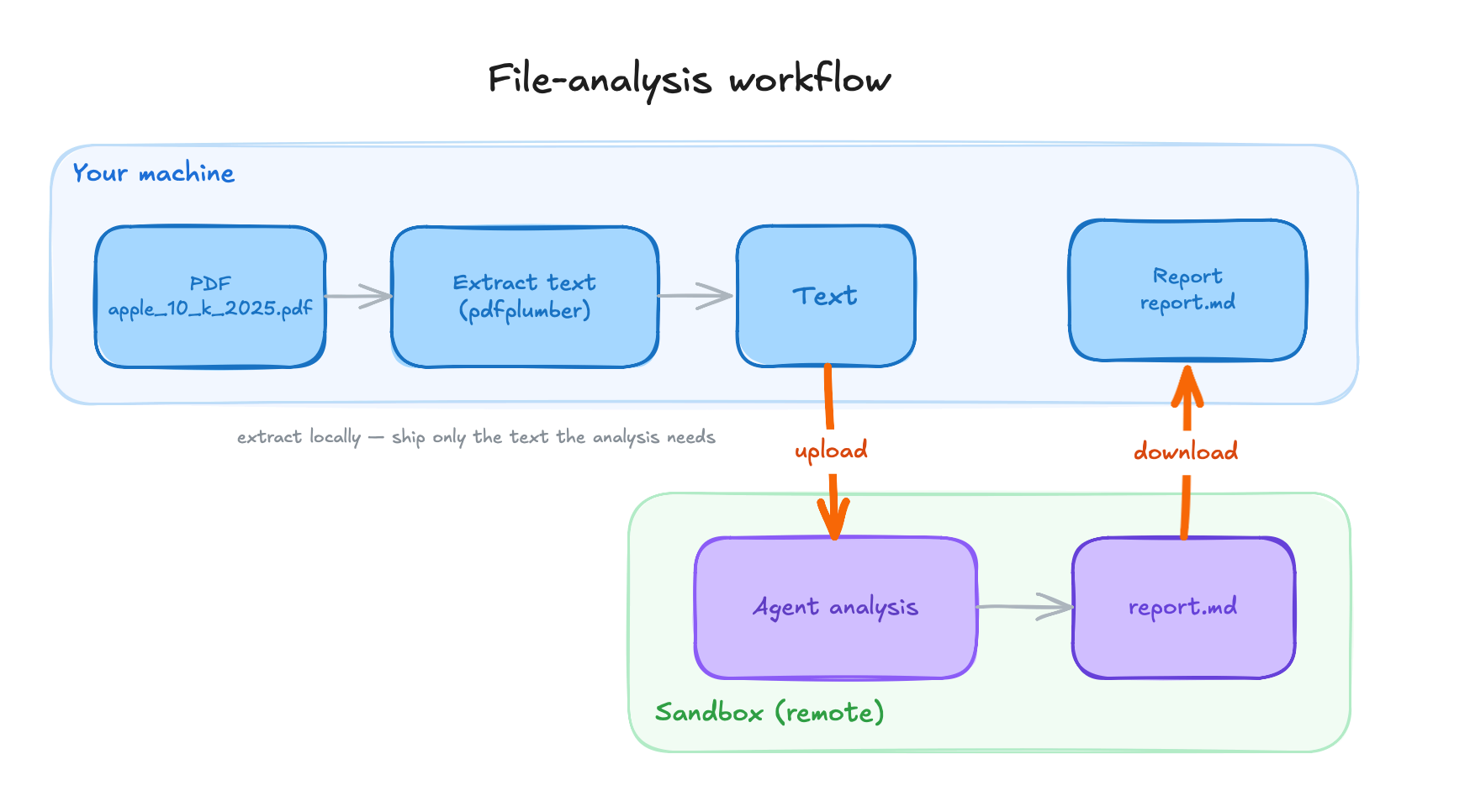 The 10-K workflow on the tool-backend wiring: text is extracted locally, uploaded to the sandbox, analyzed there, and the report is pulled back out.
The Sandbox as the Agent’s Home
In this model the whole agent lives inside the box: you install the framework there, upload a script, and launch it with sandbox.process.exec(). This is the Claude Agent SDK model. It has no sandbox backend abstraction and does not need one. The Claude Code CLI ships inside the pip package, so there is no separate Node or npm setup step; a pip install claude-agent-sdk inside the box is the whole bootstrap.
Because everything happens inside the box, the LLM calls included, the API key goes in as an environment variable. That moves the trust boundary. The key now lives in the box, so its isolation is doing real work: there is a live secret inside, and the boundary is what guards it.
sandbox.fs.upload_file(agent_script.encode(), "/tmp/agent.py")
result = sandbox.process.exec(
    "python /tmp/agent.py",
    env={"ANTHROPIC_API_KEY": os.environ["ANTHROPIC_API_KEY"]},
    timeout=0,
)
print(result.result)
On the very first run, the process got OOM-killed on the default snapshot, with no obvious error, just a dead run. The bundled CLI brings its own Node.js runtime, which adds enough resident memory at startup to push the process past the default box’s 1-2 GiB ceiling. Bumping the sandbox to 4 GiB fixed it. You only learn this by running it, which is a recurring theme.
Streaming also changes shape. There is no local loop to stream from, so the script prints its progress from inside the box, and you collect the output when exec returns. It works, but it is print-based, and you wait for the run to finish before you see the whole picture.
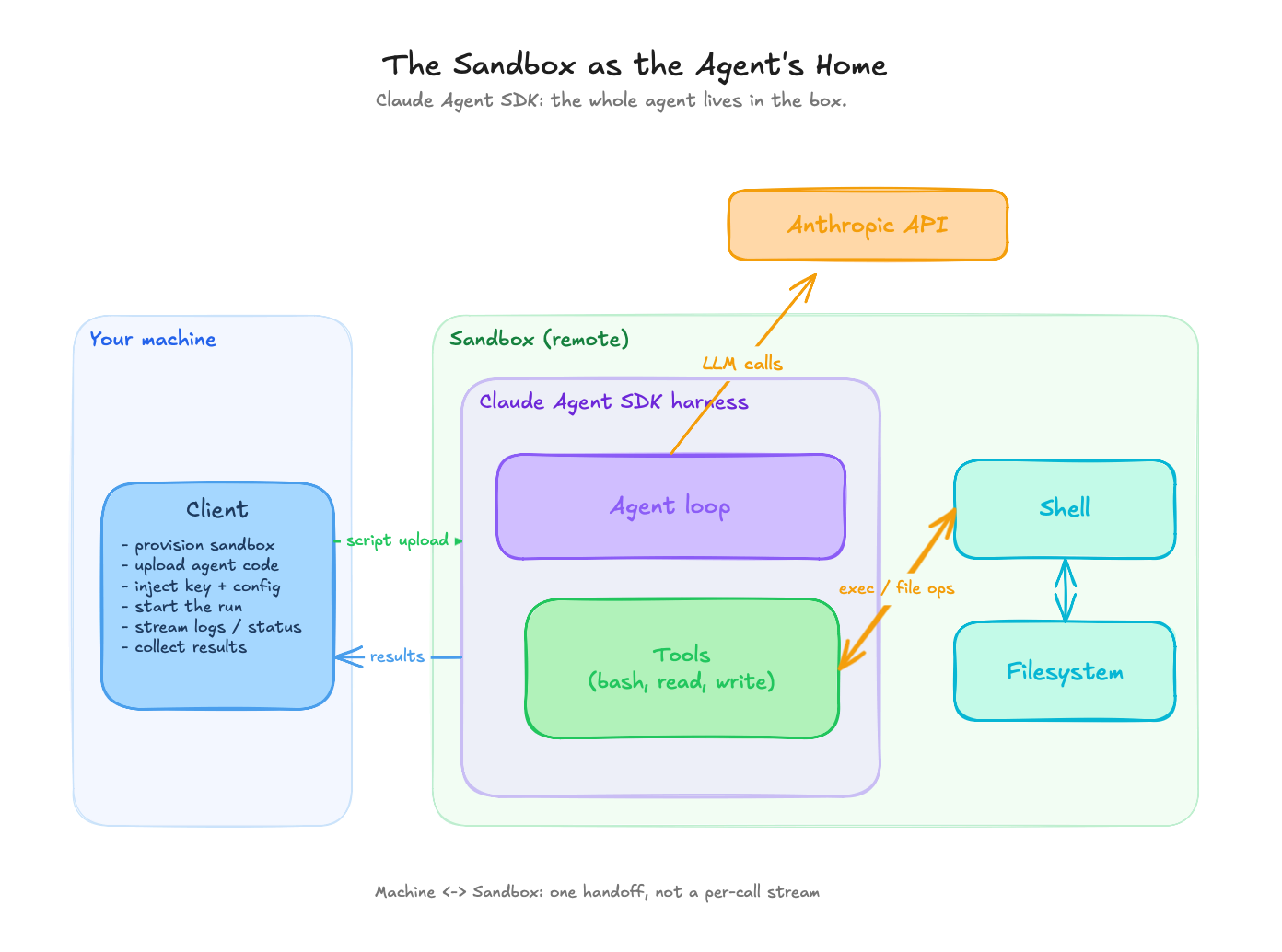 The sandbox as the agent’s home: the whole agent runs inside the box, the LLM calls leave from inside it, and the API key lives in the box.
Both tasks ran on both wirings. Once the plumbing was right, the sandbox layer was a non-event, and the work was all in the wiring. The prime-numbers script and the 10-K analysis behaved the same whether the loop sat on my laptop or inside the box.
The friction that stayed was mundane, and naming it is more useful than pretending it was not there. Explicit file movement for the 10-K on the tool-backend version. Print-based streaming on the in-box version, which means you wait for exec to return before you see the result. And the first-call cold start on a fresh box. None of it was hard. Most of the work was just setup.
Both wirings worked, so the choice between them comes down to where you want the loop, which is the next section.
Picking an Architecture
| Dimension | Sandbox as a tool backend | Sandbox as the agent’s home |
|---|---|---|
| Agent loop location | Local machine | Inside the sandbox |
| LLM call origin | Local | Inside the sandbox |
| API key handling | Stays on the local side | Passed into the box as an env var |
| Sandbox memory footprint | Light (default ~1-2 GiB) | Heavier (~4 GiB for the bundled runtime) |
| Streaming style | Native, token-by-token | Print-based, collected when the run returns |
| Setup overhead | Wrap the sandbox as a backend | Install the framework in-box, upload a script |
| Per-tool-call latency | A network round-trip per call | Local to the box, no per-call hop |
The tool-backend model fits ephemeral task execution inside a larger application. The orchestration and observability stay close to your own code, the sandboxes stay light because they are only running shell commands, and the secrets stay home. If the agent is one component of a bigger system you already operate, this model keeps that system legible.
The agent-in-the-box model fits the autonomous, long-horizon agents from the intro. It gives you the cleanest trust boundary, the agent owns its whole environment, and the orchestrator shrinks to “start it, collect results.” When the point is to hand a goal to something and walk away, putting the entire loop inside the box is the right fit.
What’s Under the Hood
Plenty of hosted services will spin up a sandbox for you over an API, and their interfaces look alike. What separates them sits one level down, in how strong a boundary they put between the sandbox and the real computer it runs on.
To see why that boundary matters, it helps to know one term: the kernel. The kernel is the core of the operating system, the program that controls the hardware and that every other program has to go through to read a file, use the network, or touch memory. A machine has exactly one kernel, and it has complete power over that machine. If code inside a sandbox can reach the kernel and exploit a flaw in it, it can break out and take over everything. So the question that separates one sandbox from the next is how much of that kernel the code inside is allowed to reach. From weakest boundary to strongest:
- A shared-kernel container. This is what most people mean by a sandbox, and it is what Docker runs. The sandboxed program is an ordinary program running on the real machine, fenced off by the operating system: it gets its own private view of the system (its own list of running programs, its own network, its own files, so it cannot see anything else on the machine), hard limits on how much CPU and memory it can use, a filter on which requests it is even allowed to make to the kernel (Docker’s defaults block dozens of the few hundred kinds of request outright), and most of an administrator’s powers stripped away. What it does not get is its own kernel. Every container on the machine shares the one real kernel, so a bug in that kernel, or a gap in how the fence was set up, becomes a way out. It has happened: CVE-2019-5736 let code inside a container overwrite a core program on the machine and seize control of it, and Leaky Vessels used a leaked internal handle to reach out onto the machine’s own files. This is the lightest and fastest boundary, and it is Daytona’s default.
- A second kernel in software. gVisor puts a stand-in kernel between the sandboxed code and the real one. When the code makes a request that would normally go to the real kernel, the stand-in catches it and answers it in software, so most requests never reach the real kernel at all. Breaking out now means getting through two separate kernels that share no code, and the stand-in itself reaches the real kernel through only a small, tightly controlled set of requests. The price is speed, because every request the code makes has to be caught and re-handled, so anything that constantly reads files or talks to the network runs slower. This is what Modal runs.
- Its own virtual machine. The strongest option gives the sandbox a full private kernel of its own, inside a real virtual machine (a microVM), the same hardware-enforced separation that keeps two customers’ servers apart in the cloud. There is no longer a shared kernel to attack at all, and breaking out means defeating the boundary the processor itself draws between virtual machines, which is far harder than escaping a container. Firecracker, which runs behind E2B and Vercel, is a version of this stripped down for speed. It cuts the virtual machine to almost nothing (around 50,000 lines of code, where traditional virtual-machine software runs to well over a million) and boots a fresh sandbox in under 125 milliseconds. The cost is a slower start and a heavier footprint than a container. This is the tier you want for code you cannot trust. Kata Containers wraps the same idea so it behaves like an ordinary Docker container, which is the level Daytona reaches when you opt into it, and BoxLite is a newer one you can run yourself: the same private-kernel sandbox, packaged so you can embed it straight into your own program with no separate service to run, and use it on a laptop or scale it out to a cloud.
Each step down this list buys a stronger boundary and pays for it in start-up time and a little ongoing slowdown. Code you wrote and started yourself is fine in a container. The less you trust what the agent might run, the further down the list you want to be.
When the code runs on your own machine, there is a lighter option that skips the remote box entirely. Anthropic’s open-source sandbox-runtime uses the sandboxing already built into your operating system (Seatbelt on macOS, Bubblewrap on Linux) to fence off a single program, and it is what Claude Code uses to box in the commands it runs on your machine. The boundary is weaker than a remote virtual machine, and it is the right tool when all you need is to contain something on the laptop in front of you.
The Cost of Sandboxing
The cost has two halves, and both are smaller than the friction made me expect: performance and dollars.
On performance, spinning up isolation costs time, but less than you would guess. Cold starts run from sub-100ms for a container to a few hundred milliseconds for a microVM boot, and they drop to low double-digit milliseconds when a provider restores a snapshot or forks a warm pool. Runtime overhead is near-native for pure compute and bites hardest on work that leans on the filesystem or makes constant requests to the kernel, the kind a software stand-in kernel like gVisor has to catch and re-handle one call at a time. For an agent that spends most of its wall-clock time waiting on LLM calls, the isolation tax is mostly noise.
On dollars, at task scale a single run costs cents: roughly two cents on Daytona and four on Modal for a ten-minute run on one core with 4 GiB, at each provider’s sandbox rate and in the ballpark of their published figures. Both providers’ free tiers covered all the experimentation here many times over, so none of it cost me anything.
The difference that matters is the billing model. Daytona bills while the box is alive, so short busy bursts stay cheap. Modal bills only while code is running, so long-but-idle sessions avoid paying for nothing. Match the model to the workload, because the gap between them widens exactly as your agent’s idle-to-busy ratio changes.
Where This Goes
Sandboxes are on their way to becoming a default layer of the agent stack, the way containers became the default unit of deployment. The interesting question is what happens after that.
The long-horizon agents from the intro will want more than a throwaway box. Things get interesting when the sandbox stops being disposable: a persistent computer per agent means state, memory, and identity that survive across runs, which is the direction my OpenClaw experiments keep pushing toward, giving an assistant its own machine to live on, one that persists across runs. That is a different security posture and a different design problem, and I do not think the answers are settled.
For now, the question I would leave you with is the smaller, more immediate one. The agents you are already running today, the ones with auto-approve flipped on: what computer are they running on?
References
- The lethal trifecta (Simon Willison)
- Running untrusted code safely (Modal)
- Firecracker, the microVM behind E2B and Vercel
- gVisor, a user-space kernel for syscall isolation
- Anthropic’s sandbox-runtime, local OS-level sandboxing (Seatbelt and Bubblewrap)